Navigating the ever-evolving world of PC gaming in 2026, many players wonder how much RAM is truly needed for a smooth Roblox experience. This comprehensive guide delves into the optimal RAM configurations, considering the increasing complexity of user-generated content, updated engine features, and the demands of multitasking on modern gaming rigs. Whether you are a casual player enjoying basic experiences, a dedicated developer creating intricate worlds, or a parent building a system for a young gamer, understanding RAM requirements is crucial. We explore the baseline, recommended, and enthusiast-level RAM specifications, compare DDR4 and DDR5 performance in Roblox's ecosystem, and offer practical tips for optimizing your system memory. Discover how to identify bottlenecks, choose the right RAM speed and capacity, and ensure your Roblox adventures remain lag-free and enjoyable. From 8GB to 32GB, we break down what each tier offers for Roblox and overall PC performance, ensuring you make an informed decision for your 2026 setup.
How much RAM is truly needed for Roblox in 2026?
For a consistently smooth and enjoyable Roblox experience in 2026, 16GB of RAM is highly recommended. While 8GB is the absolute minimum, 16GB provides ample headroom for Roblox, the operating system, and common background applications, ensuring faster loading times and reduced stuttering in complex user-generated games.
Is 8GB RAM enough for Roblox in 2026?
8GB RAM can run Roblox in 2026, but it's considered the bare minimum. You may experience occasional lag and longer loading times in graphically intense or script-heavy experiences, especially if you have other applications running in the background. For optimal performance, 16GB is the preferred choice.
What is the best RAM capacity for Roblox developers in 2026?
For Roblox developers in 2026 who frequently use Roblox Studio for complex projects, 32GB of RAM is highly recommended. This capacity allows for seamless asset creation, intricate scripting, and efficient testing within Studio, preventing bottlenecks that could hinder productivity and workflow.
Does RAM speed matter for Roblox performance?
Yes, RAM speed and latency do matter for Roblox performance. Faster RAM (e.g., 3600MHz DDR4 or 5600MHz+ DDR5) reduces data access times, improving overall system responsiveness and allowing the CPU to process game information more efficiently. While capacity is primary, speed contributes to a snappier experience.
Should I upgrade to DDR5 RAM specifically for Roblox in 2026?
Upgrading to DDR5 RAM primarily for Roblox in 2026 is beneficial for new, high-end builds seeking future-proofing and marginal performance gains. While DDR5 offers superior speeds, a well-optimized DDR4 system with 16GB at 3600MHz still provides excellent Roblox performance. Consider overall system compatibility and budget before upgrading for Roblox alone.
Guide: How Much RAM for Roblox in 2026?
Welcome, PC gamers! In 2026, the landscape of digital entertainment continues to evolve at a breathtaking pace, with titles leveraging AI enhancements, the rise of cloud gaming, and hardware pushing boundaries for high-refresh-rate monitors and immersive ray tracing. Amidst this technological surge, one platform consistently remains a fan favorite across all age groups: Roblox. From intricate simulations to fast-paced action games, user-generated content on Roblox has grown exponentially in complexity and visual fidelity. As experiences become more detailed and players engage in multi-tasking—perhaps streaming, chatting on Discord, or browsing while playing—a crucial question arises: how much RAM for Roblox is truly needed to ensure a smooth, lag-free experience in 2026?
This comprehensive guide is tailored for U.S.-based PC gamers, whether you're building a new rig, considering an upgrade, or simply optimizing your current setup. We'll dive deep into the memory requirements for Roblox, debunk common myths, and provide actionable insights to help you get the most out of your hardware. By the end of this article, you'll have a clear understanding of what RAM capacity, speed, and configuration best suits your Roblox habits and overall PC gaming needs in the current year.
Understanding RAM and Its Role in Roblox Performance
Random Access Memory (RAM) acts as your PC's short-term memory, enabling your system to quickly access data needed for active applications and processes. For gaming, including Roblox, sufficient RAM is critical. It stores game assets, textures, code, and operating system components, allowing your CPU to fetch information rapidly without relying solely on slower storage drives. Without enough RAM, your system resorts to using virtual memory on your slower SSD or HDD, leading to noticeable stuttering, longer loading times, and an overall sluggish experience. For Roblox, where user-created games can vary wildly in optimization and asset count, having adequate RAM can make all the difference between seamless play and frustrating freezes.
As we head further into 2026, Roblox experiences are becoming more sophisticated. Engines like 'Fidelity Engine' or advanced 'Luau' scripting pushes for more dynamic environments and richer visuals, which naturally demand more system resources. Your goal is to provide enough RAM for Roblox itself, plus your operating system, background applications, and any other tasks you perform concurrently. So, let's explore the specific RAM recommendations.
How Much RAM for Roblox: Core Recommendations
What is the absolute minimum RAM for Roblox in 2026?
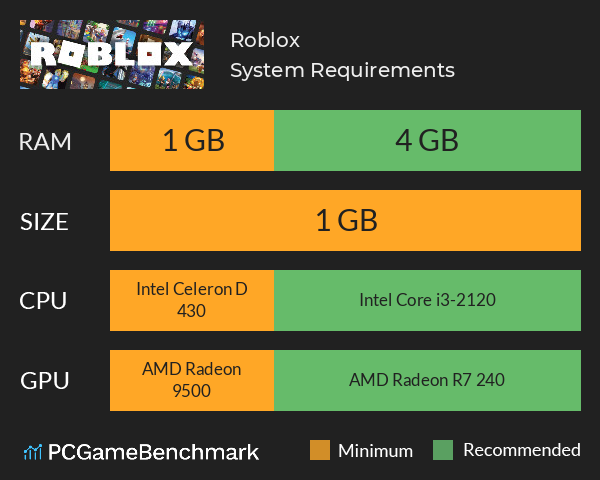
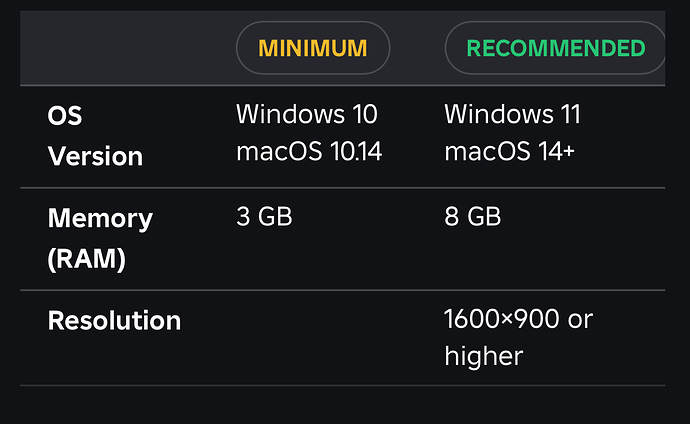
While Roblox technically states a minimum of 4GB of RAM, for a truly playable and non-frustrating experience in 2026, 8GB of RAM is the absolute minimum we recommend. This capacity allows for the operating system and Roblox to run concurrently, but you will likely face performance bottlenecks when running complex games or if many background applications are open. Expect occasional stutters and longer loading times in visually dense or script-heavy Roblox experiences. It's a barebones option for very budget-constrained systems.
What is the recommended RAM for a smooth Roblox experience in 2026?
For a consistently smooth and enjoyable Roblox experience in 2026, 16GB of RAM is highly recommended. This capacity provides ample headroom for Roblox, Windows 11, Discord, a web browser with multiple tabs, and even a light streaming application running simultaneously. Most modern PC gaming setups target 16GB as the sweet spot, offering excellent performance-to-cost ratio. You'll notice significantly faster loading, less stuttering, and the ability to comfortably jump between different Roblox experiences and other applications without slowdowns.
When should I consider 32GB of RAM for Roblox in 2026?
While 16GB is sufficient for most players, 32GB of RAM is ideal for power users, content creators, and dedicated Roblox developers in 2026. If you frequently multitask with demanding applications like video editing software, 3D modeling tools (for Roblox Studio assets), or multiple game clients running alongside Roblox, 32GB will prevent any RAM-related slowdowns. It's also beneficial for those who host private servers, run complex simulations, or simply want ultimate future-proofing for their system. For the average Roblox player, 32GB might be overkill, but it ensures a completely unconstrained memory environment for any task.
Does RAM Speed and Latency Matter for Roblox?
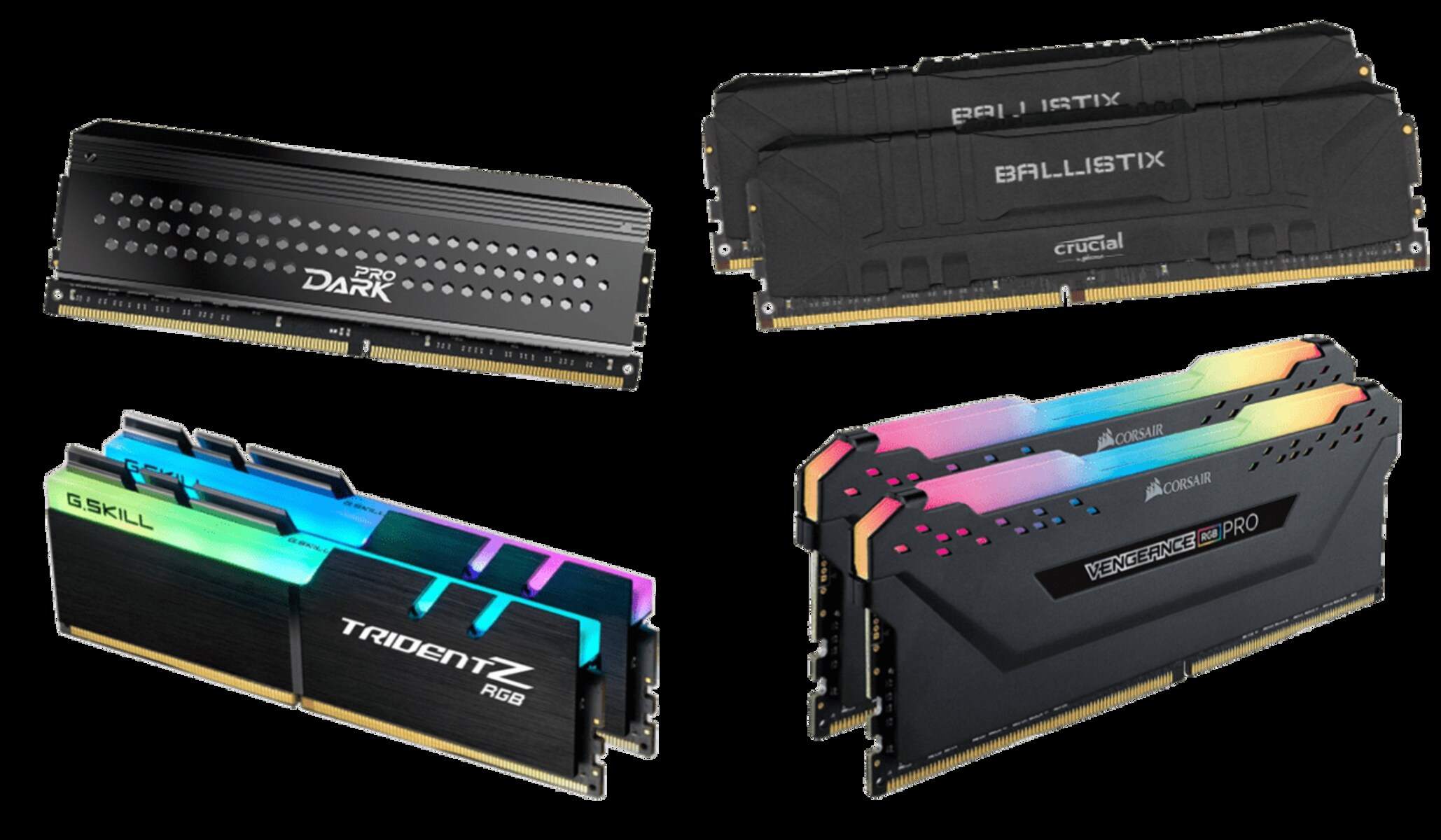
Yes, while capacity is often the primary focus, RAM speed (measured in MHz) and latency (CAS Latency or CL) also play a role in Roblox performance. Faster RAM can reduce data access times, allowing your CPU to process information more quickly. For 2026 systems, DDR4 RAM operating at 3200MHz to 3600MHz is considered optimal for price/performance. If you are building a new system with a modern Intel or AMD CPU, DDR5 RAM with speeds ranging from 5200MHz to 6400MHz (or even higher) offers a noticeable uplift, especially in CPU-bound scenarios. While Roblox itself might not push RAM speeds to their absolute limit, the overall system responsiveness, especially with other applications open, definitely benefits from faster RAM.
DDR4 vs DDR5 RAM: Which is better for Roblox in 2026?
In 2026, the choice between DDR4 and DDR5 RAM largely depends on your budget and motherboard compatibility. DDR5 offers superior speeds and efficiencies, making it the better choice for new high-end builds and future-proofing. However, it typically comes at a higher cost for both the RAM modules and compatible motherboards. For Roblox, while DDR5 will provide a marginal performance boost, a well-optimized DDR4 system (e.g., 16GB at 3600MHz) will still deliver an excellent experience. If you are upgrading an older system, sticking with DDR4 is often more cost-effective. For new builds, DDR5 is the way to go if your budget allows, ensuring you benefit from the latest memory technology.
How do background applications affect RAM usage for Roblox?
Background applications can significantly impact the amount of available RAM for Roblox. Programs like web browsers (especially with many tabs), Discord, Spotify, streaming software (OBS, Streamlabs), and even antivirus programs consume system memory. If you have only 8GB of RAM and multiple background apps running, Roblox might struggle to get the memory it needs, leading to performance issues. Even with 16GB, closing unnecessary applications before playing resource-intensive Roblox experiences is a good practice to ensure maximum available RAM and optimal performance. Task Manager (Ctrl+Shift+Esc) is your friend for monitoring and managing background processes.

Optimizing Your RAM for Roblox: Tips and Tricks
Beyond simply having enough RAM, there are several ways to optimize your system's memory for the best Roblox performance:
Enable XMP/DOCP in BIOS
Most RAM modules are sold with higher speeds than their default settings. To unlock the advertised speed of your RAM, you'll need to enable its Extreme Memory Profile (XMP for Intel) or D.O.C.P. (Direct OverClock Profile for AMD) in your motherboard's BIOS/UEFI settings. This ensures your RAM operates at its optimal frequency, providing a noticeable boost in overall system responsiveness and, by extension, game performance.
Close Unnecessary Background Programs
Before launching Roblox, take a moment to close any applications you aren't actively using. This includes web browsers, messaging apps, and other non-essential software. Every megabyte of RAM freed up can contribute to a smoother Roblox experience, especially if you're on a lower-capacity system.
Monitor Your RAM Usage
Use Task Manager (Windows) or Activity Monitor (macOS) to keep an eye on your RAM usage while playing Roblox. This can help you identify if RAM is a bottleneck in your system. If your usage consistently hovers near 90-100% when playing, it's a strong indicator that you could benefit from more RAM.
Consider Dual-Channel RAM Configuration
If your motherboard supports it (most do), installing RAM in matched pairs (e.g., two 8GB sticks instead of one 16GB stick) enables dual-channel mode. This configuration effectively doubles the memory bandwidth, leading to significant performance improvements in games and applications. Always refer to your motherboard's manual for the correct slot placement to activate dual-channel mode.
Keep Your Drivers Updated
While not directly related to RAM capacity, ensuring your graphics drivers, chipset drivers, and Windows operating system are up-to-date can improve overall system stability and efficiency. Optimized drivers can better manage hardware resources, including RAM, leading to better gaming performance.
Future Outlook: Roblox and RAM in 2026 and Beyond
As we look to the future, Roblox is expected to continue its trajectory of increasing visual fidelity and complexity. New features, more detailed assets, and potentially even more advanced AI-driven NPCs within experiences will likely push memory demands further. While 16GB of RAM is the sweet spot for 2026, it wouldn't be surprising if by 2028, 32GB becomes the recommended baseline for a truly high-end experience, especially as DDR5 technology matures and becomes more affordable.
Cloud gaming, though not directly impacting local RAM for Roblox, could influence how users interact with the platform. However, for local play and development, local RAM will remain paramount. The trend towards larger, more immersive open worlds within Roblox will undoubtedly necessitate more robust hardware, with RAM being a key component in that evolution. Investing in a decent amount of fast RAM now will serve you well for years to come.
Conclusion: Choosing the Right RAM for Your Roblox Adventure
In conclusion, when considering how much RAM for Roblox you need in 2026, 16GB stands out as the ideal capacity for the vast majority of players, offering a perfect balance of performance and value. If you are on a strict budget, 8GB can get you by, but prepare for some compromises. For enthusiasts, developers, and heavy multitaskers, 32GB provides ultimate headroom and future-proofing. Remember that RAM speed, latency, and proper dual-channel configuration also contribute to a snappier, more responsive system.
By understanding your usage patterns and following the optimization tips outlined in this guide, you can ensure your Roblox adventures remain smooth, enjoyable, and free from memory-related bottlenecks. Now go forth and conquer those virtual worlds! What's your favorite Roblox experience to push your PC's limits? Share your thoughts in the comments below!
Frequently Asked Questions About Roblox RAM
Will 8GB RAM be enough for Roblox in 2026?
While 8GB RAM meets Roblox's minimum specifications, for 2026 standards and complex games, it will likely be just enough. You might experience occasional stuttering and slower loading times, especially if other applications are running in the background. 16GB is highly recommended for a truly smooth experience.
Is 16GB RAM overkill for Roblox?
No, 16GB RAM is not overkill for Roblox in 2026; it's the recommended sweet spot. It provides ample memory for Roblox, the operating system, and common background applications like Discord or a web browser, ensuring consistently smooth performance across a wide range of experiences without bottlenecks.
Does faster RAM improve Roblox performance?
Yes, faster RAM (higher MHz and lower CAS Latency) can improve Roblox performance, though the impact is often more noticeable in overall system responsiveness and CPU-bound scenarios. While not as critical as capacity, optimizing RAM speed via XMP/DOCP can provide a snappier experience, especially with modern CPUs and integrated graphics.
Can too much RAM hurt Roblox performance?
No, having 'too much' RAM (e.g., 32GB or 64GB) will not hurt Roblox performance. While it might be more than Roblox actively utilizes, it provides significant headroom for future applications, development tasks, and heavy multitasking without any negative impact on Roblox itself. The only downside is the cost.
Should I get DDR4 or DDR5 RAM for Roblox in 2026?
For new builds in 2026, DDR5 RAM is generally recommended for its superior speed, efficiency, and future-proofing, especially if your budget allows. However, a well-configured DDR4 system (e.g., 16GB at 3600MHz) still offers excellent Roblox performance at a lower cost, making it viable for upgrades or budget-conscious new builds.
Does RAM affect Roblox Studio performance?
Yes, RAM significantly affects Roblox Studio performance. Developing complex games with numerous assets, scripts, and plugins consumes substantial memory. For smooth development, faster asset loading, and lag-free testing within Studio, 16GB of RAM is a solid minimum, with 32GB highly recommended for serious developers.
Optimal RAM for Roblox is 16GB in 2026 for balanced performance. 8GB is minimal, 32GB is enthusiast-level for heavy multitasking or development. DDR5 offers future-proofing over DDR4. RAM speed and latency impact performance. Background applications increase RAM needs. Proper RAM management is crucial for a smooth experience.
35


Cu Nta RAM Necesitas Para Roblox Adcod Com How Much Ram Do You Need For Roblox 300x228 . How Much RAM Do I Need To Play Roblox Robots Net How Much Ram To Play Roblox 1700446474 . How To Allocate More RAM To Roblox Robots Net How Much Ram Do You Need For Roblox 1700473668 . 100 Unofficial Roblox Annual 2026 Brand New For 2025 The Iconic SL1500 . Roblox Using Too Much RAM Fix High Memory Usage Fast



Roblox System For PC Mac And Mobile 2025 3750x1962 . When Will DDR5 Prices Drop 2026 Memory Market Forecast Unibetter Ddr5 Price 2026 . Fisch AFK Macro How To Set Up Auto Fishing On Roblox V13 Fisch Afk Macro How To Set Up Auto Fishing On Roblox V13 1311f8 . Every Potion In Roblox The Forge And How To Use Them Well Roblox 10531477636 . Best Laptop For Roblox In 2026 Top 6 Picks PCVenus Best Laptop For Roblox

How To Fix Roblox Crashing On Mobile IPhone Android Fix Roblox Crashing On Mobile Screenshot 2617.webp. RAM Prices 2026 Why They Are Rising When To Buy Unnamed 1 . How Much RAM To Play Roblox Robots Net How Much Ram Do I Need To Play Roblox 1700441530 . Definitive Guide To Roblox 2026 TM 07169 Definitive Guide To Roblox 2026 . How Much RAM Do I Need To Play Roblox Robots Net How Much Gb Ram Does Roblox Need 1700537189



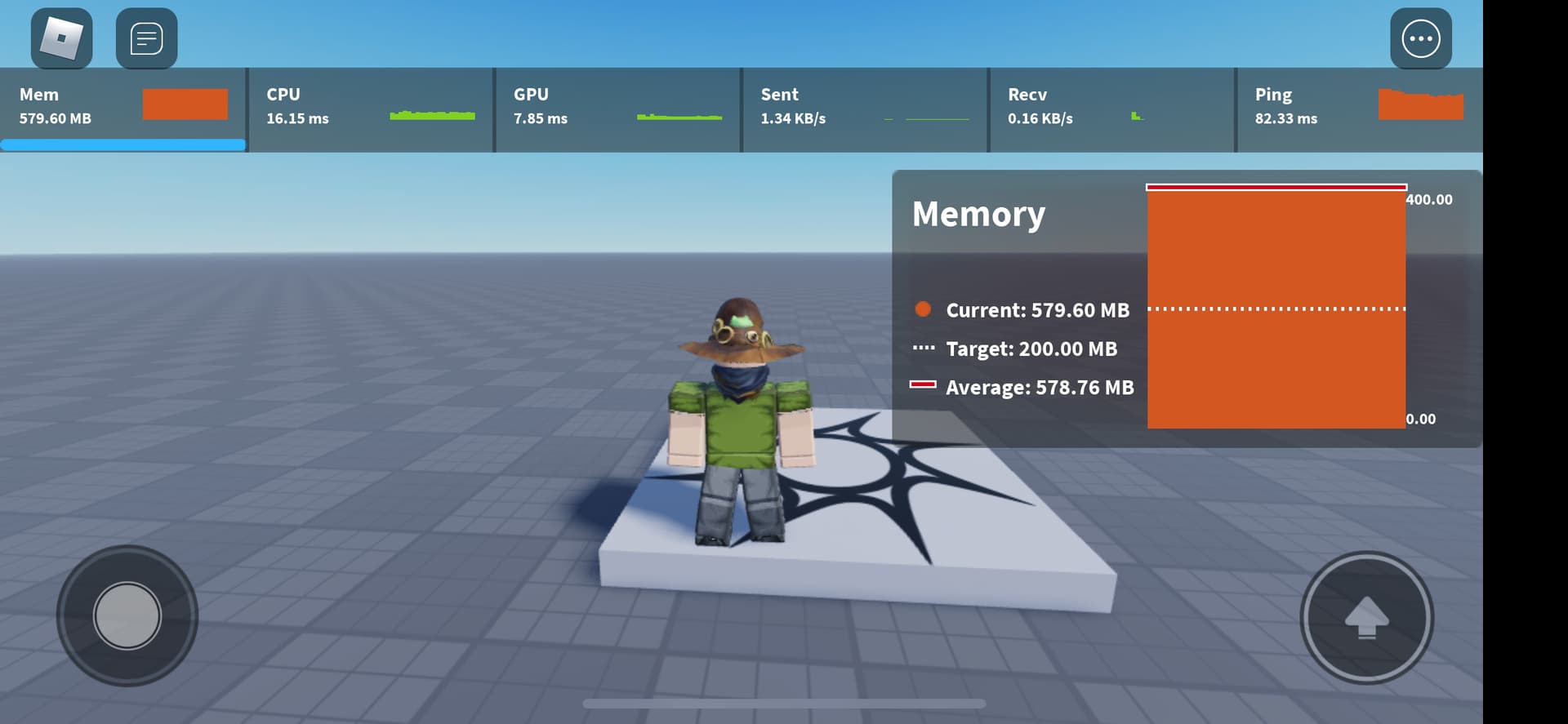
As A Roblox Developer It S Currently Impossible To Hit The 200 00 MB . Guide How Much Is Valkyrie Roblox Worth 2026 Roblox 2026 Creator Reality . What Are The Minimum Roblox For Gaming 2026 Parental Guide For Roblox Usage UnicMinds . How Much RAM To Play Roblox Robots Net How To Give More Ram To Roblox 1700387138 . What Is The Roblox ESRB Rating For Young Gamers And Parents



How Roblox Reports Work A 2026 Player S Guide Oar2 . Roblox 2025 Can I Run It Roblox System Graph . T I Roblox PC 2026 Mi N Ph H Ng D N C I T Nhanh Roblox Download 4 300x200 . Ryzen 5 2600X And GeForce GTX 1060 Roblox FPS Calculation 0Qb 0Vw 03S Banner . How To Publish A Game On Roblox In 2026 Roblox YouTube


How Much RAM Does Roblox Studio Need Games Learning Society Hqdefault . How Much RAM Do I Need To Play Roblox Robots Net How To Download Roblox On Computer 1696020211 . Why Is Roblox Using So Much RAM Fix It Fast. 2026 Ram 1500 Near Poteet TX Allways Atascosa Ram 2026RAM1500 Exterior 01 . How Much RAM Do You Need For Roblox Robots Net How To Allocate More Ram To Roblox 1700554926



The Best Budget Android Tablets In 2026 Top Affordable Picks For Every Android Tablet Gaming Wireless Controller Mobile Gaming 1030x687 . Roblox En 2026 Juega En Roblox NoFilter. Roblox Studio Taking Too Much Resources Platform Usage Support 2 690x424 . How To Allocate More RAM To Roblox Step By Step Free Gift Cards . ROBLOX VAI MUDAR DE LOGO EM 2026 YouTube