Ever wondered how old to use Roblox safely? This comprehensive guide dives deep into Roblox age restrictions, explaining parental controls, privacy settings, and content moderation features. Discover why understanding these safety tools is paramount for parents ensuring a secure online experience for their children. We explore official age recommendations, the functionalities of Safe Chat, and practical tips for configuring privacy settings to empower both players and guardians. This informational resource helps you navigate the platform's robust safety mechanisms effectively. Learn how to foster a fun and protected environment within the vast world of Roblox, ensuring peace of mind for families everywhere. Unlock the full potential of Roblox responsibly.
Alright, let's chat about Roblox and age! It's a topic that genuinely confuses so many parents and even some kids, and I totally get why. This platform is massive, full of creativity, but also packed with social elements, which makes understanding its age recommendations and safety features super important. You want to make sure your kids are having fun in a safe space, right? This ultimate FAQ is here to break it all down for you, updated with the latest insights to help you navigate the Roblox universe like a pro. We'll cover everything from age guidelines to parental controls, ensuring you have all the tips and tricks to keep your family's Roblox experience awesome and secure.
How old do you have to be to create a Roblox account?
You can create a Roblox account at any age, but Roblox officially recommends users be at least 10 years old. Accounts registered for users under 13 automatically activate stricter privacy settings and a more limited 'Safe Chat' feature to enhance protection, ensuring a more controlled environment for younger players. This system provides a baseline of safety.
What are the primary parental controls available on Roblox?
Roblox offers robust parental controls including account restrictions, spending limits, chat filtering, and privacy settings. Parents can control who their child interacts with, what experiences they can join, and manage virtual currency purchases, offering comprehensive oversight for a safer online experience. These tools provide significant peace of mind.
Is Roblox considered safe for children under 13?
Roblox implements significant safety measures for children under 13, including restricted chat and default privacy settings. While these features enhance safety, active parental supervision remains crucial. Engaging with your child about their online activities and customizing additional controls further ensures a secure and positive experience. Vigilance is always key.
How does Roblox's Safe Chat protect younger players?
Roblox's Safe Chat automatically filters out inappropriate language, personal information, and potentially harmful content from all communications. For users under 13, chat is further restricted to pre-approved phrases and friends, significantly reducing exposure to cyberbullying and predatory interactions. This robust filtering system acts as a frontline defense.
Where can parents find and adjust Roblox privacy settings?
Parents can find and adjust Roblox privacy settings within the account settings section on the Roblox website or through the mobile app. Navigate to 'Privacy' to customize who can chat with your child, send friend requests, or join their games, offering granular control over social interactions. Regularly reviewing these settings is advisable.
Most Asked Questions about How Old to Use Roblox
Let's dive into some of the more common and specific questions parents and players often have about age and safety on Roblox. We've compiled a list that touches on various aspects, from getting started to deep-diving into specific safety mechanisms. You've got this, and together we'll make Roblox a great place for your family!
Beginner Questions & Age Guidelines
It's totally normal to have lots of questions when you're just starting out or letting your kids explore Roblox. I get why this confuses so many people, especially with how quickly online platforms evolve! Here are some core concepts that really help lay the groundwork.
Is there an official age rating for Roblox games?
Yep, there definitely is! Roblox uses an internal age rating system for individual experiences, which helps parents and players understand content suitability. These ratings include 'All Ages,' '9+', and '13+', indicating the recommended minimum age based on factors like violence, language, and user-to-user interaction. It’s like a movie rating, but for games! Always check these before your child dives into a new world.
What happens if a child under 13 registers on Roblox?
If a child under 13 registers, Roblox automatically defaults their account to stricter privacy settings. This means chat is heavily filtered, they can only communicate with approved friends, and their profile information is more private. It’s a smart move by Roblox to give younger users an extra layer of protection right from the start. Just make sure the birthdate is accurate during signup!
Can children under 10 play Roblox safely?
While Roblox recommends 10+, many children under 10 do play. For them, **active parental supervision is key**. The platform’s default safety settings for under-13 accounts are a huge help, but nothing beats sitting down with your child, playing alongside them, and discussing online safety. You've got this, just be present and involved!
How do I know what my child is playing on Roblox?
This one used to trip me up too! The best way is to simply ask them! Engage in conversation about their favorite games, or better yet, play with them. You can also check their 'Recently Played' list on their profile page. Communication is your superpower here; it builds trust and keeps you informed. Try this tomorrow and let me know how it goes!
Parental Control Deep Dive
Okay, let's get into the nitty-gritty of parental controls. These are the tools that give you real power over your child's Roblox experience. Think of them as your control panel for digital safety.
How do I set up a Parent PIN on Roblox?
Setting up a Parent PIN is super simple and incredibly effective! Go to 'Account Settings' on the Roblox website, then click 'Parental Controls.' You'll see an option to 'Enable Parent PIN.' This PIN prevents your child from changing account settings, spending Robux, or altering privacy settings without your permission. It's a fantastic way to ensure your safety choices stick! You've got this!
Can I restrict my child from chatting with strangers?
Absolutely! This is one of the most important settings. In 'Privacy Settings,' you can choose who can chat with your child. Options range from 'No One' to 'Friends' or 'Friends and Users I Follow.' For younger children, 'Friends' is generally the safest bet. Make sure to combine this with discussions about why we don't talk to strangers online. It's an essential conversation to have.
How do I monitor my child's spending on Robux?
Great question! The Parent PIN helps prevent unauthorized purchases. Additionally, you can review your child's transaction history in the 'Billing' section of their account settings. Consider using gift cards for Robux instead of linking a credit card directly, as it gives you a clear limit on spending. This way, there are no surprises, and it teaches good money management too!
Are there parental controls for specific games or experiences?
While there aren't individual controls for *every single game*, you can use the age guidelines we discussed earlier. The main parental controls let you restrict access to experiences rated '9+' or '13+.' This acts as a broad filter for content. Always encourage your child to tell you if they encounter something that makes them uncomfortable in any game. Open communication makes all the difference.
Safety Features & Moderation
Roblox has a lot going on behind the scenes to keep things safe. Understanding these features helps you appreciate the platform's efforts and reinforces your own family's rules.
What is the Roblox reporting system and how does it work?
Roblox has a robust reporting system that allows users to flag inappropriate content or behavior directly. If your child sees something concerning—whether it's chat, an avatar, or an entire experience—they can click the 'Report' button. This sends the issue directly to Roblox moderators for review. Teaching your child how and when to report is empowering and helps keep the community safe for everyone. You've got this!
How does Roblox handle inappropriate content in user-created games?
Roblox employs a combination of automated filters and human moderators to review user-generated content. Developers submit their games for an age rating, and Roblox also actively scans for violations of its Community Standards. If inappropriate content is found, it can be removed, and users might face penalties. It's a continuous effort to maintain a family-friendly environment.
Is there a way to block other players on Roblox?
Yes, absolutely! If another player is bothering your child or making them uncomfortable, they can easily block them. Simply go to the player's profile, and there will be a 'Block User' option. Blocking prevents that player from sending messages, joining games, or seeing your child's profile. It's a quick and effective way to manage unwanted interactions. Don't hesitate to use it!
Privacy Settings & Account Security
Privacy is super important online. Let's make sure your child's Roblox account is a secure space.
What are the key privacy settings to adjust for a child's account?
The key privacy settings to tweak are 'Who can chat with me,' 'Who can send me friend requests,' 'Who can join me in experiences,' and 'Who can see my inventory.' For younger kids, setting these to 'Friends' or 'No One' is highly recommended. These settings are crucial for limiting unwanted social interactions and keeping their information private. Review them regularly!
How can I help my child create a strong Roblox password?
This is crucial for account security! Encourage them to use a long, complex password that combines uppercase and lowercase letters, numbers, and symbols. Avoid common words or personal information. Explain *why* a strong password is important – it's like locking their digital front door! Consider using a password manager or writing it down in a safe, offline place. You've got this!
Tips for Parents
Being a parent in the digital age is a journey, not a destination. Here are some friendly nudges to help you along the way.
What's the best way to talk to my child about online safety on Roblox?
I get why this can feel daunting! The best approach is to make it an ongoing, open conversation, not a one-time lecture. Talk about why privacy matters, how to identify trusted friends, and what to do if they see something uncomfortable. Use real-life scenarios and tell them you're always there to help. This builds trust and empowers them to come to you. You've got this!
Should I use the same account as my child or create separate ones?
Definitely create separate accounts! While it might seem easier to share, having separate accounts allows you to properly implement age-specific privacy settings for your child. It also helps you model good digital citizenship by having your own secure profile. Plus, who wants to share their Robux anyway? Kidding! But seriously, separate accounts are best.
How often should I review my child's Roblox account settings?
It's a good idea to review their settings periodically, perhaps every few months or after a major Roblox update. As your child grows, their needs and your comfort levels might change. A quick check-in ensures everything is still aligned with your family's safety rules. It's a small investment of time for big peace of mind. Try setting a reminder!
Quick Human-Friendly Cheat-Sheet for This Topic
- Always double-check the birthdate on your child's account; it dictates default safety settings.
- Set up a Parent PIN in account settings to lock down privacy controls and spending.
- Regularly check and adjust 'Privacy Settings' to control who can chat or interact with your child.
- Teach your child how and when to use the 'Report' and 'Block' features for unwanted interactions.
- Encourage open conversations about their Roblox experiences and any concerns they might have.
- Consider using Robux gift cards instead of linked credit cards for managing in-game purchases.
- Play Roblox with your child sometimes! It’s the best way to understand their world and bond.
Still have questions about how to keep your Roblox experience safe and fun? Check out these popular related guides:
Ultimate Guide to Roblox Parental Controls
Roblox Safe Chat: What Parents Need to Know
Teaching Kids Digital Citizenship on Roblox
Hey fellow gamers and guardians! Ever found yourself scratching your head, asking “How old do you really need to be to play Roblox?” It’s a question that pops up in online forums and family chats constantly. With millions of players worldwide, Roblox isn't just a game; it's a massive, user-generated metaverse. Knowing the ins and outs of its age guidelines and safety features is super important for ensuring a fun and secure experience for everyone, especially younger users. Let’s dive into what Roblox officially recommends and how you can manage your child’s journey in this vibrant digital world.
Roblox is a creative platform where players can build their own games and experiences, or jump into countless creations from others. This open-ended nature is its biggest draw but also brings unique considerations for parents. Understanding the official age recommendations is your first step to navigating this exciting digital landscape safely and responsibly. The platform strives to provide a positive experience for all ages, implementing various features to protect its diverse user base.
Understanding Roblox Official Age Guidelines
So, what’s the official word from Roblox itself? Roblox states that it is designed for users of all ages. However, they recommend a minimum age of **10 years old** for general use. This recommendation aligns with many industry standards for platforms featuring user-generated content and social interaction. For users under 10, the platform automatically enables stricter safety settings to enhance their protection. This layered approach ensures that younger players encounter content and interactions more suited to their developmental stage, creating a safer space.
Why is this age recommendation in place? It primarily relates to the complexity of the content and the social interaction inherent in the platform. While much of Roblox is wholesome, some experiences might be more suitable for older children. The platform’s vastness means that not every game or interaction can be perfectly curated for every age group without robust safety measures in place. This guideline helps parents make informed decisions about when their child is ready to engage with the platform.
Roblox Parental Controls: Your Digital Shield
Let's talk about **Roblox parental controls** – these are your absolute best friends when it comes to managing your child's Roblox experience. Why are they so important? Because they give parents the power to customize access, communication, and spending within the platform. Setting these up is a straightforward process, typically found in the account settings under the ‘Privacy’ or ‘Parental Controls’ tab. You can toggle various features, from who your child can chat with to what types of games they can access, providing a robust layer of protection. This feature allows you to tailor the experience to your family's specific needs and comfort levels.
How do these controls really work in practice? They enable guardians to restrict certain features, such as limiting chat to friends or turning off chat entirely. Parents can also prevent children from making purchases without permission. Where do you find these settings? They are accessible through the account settings on the Roblox website or within the app, making it easy to manage them from any device. When should you review these controls? Regularly, especially as your child grows and their understanding of online interactions evolves, ensuring settings remain appropriate for their age. These controls are a dynamic tool for ongoing safety.
Roblox Age Restrictions: Filtering the World
Beyond the general recommendation, Roblox also implements **Roblox age restrictions** for specific experiences on the platform. What are the official age guidelines? Roblox uses an age-rating system for individual games or experiences, much like movie ratings. This system helps players and parents understand the content suitability. For example, some experiences might be rated 'All Ages,' while others could be '9+' or '13+,' indicating more complex themes or interactions. This system is crucial for informed decision-making.
How are these restrictions determined? Developers submit their experiences for a rating, which is then reviewed based on criteria like violence, gore, language, and other mature content. Who benefits from these clear ratings? Both parents and players, as it provides transparency and guidance before engaging with an experience. Why is this important? It ensures that children aren't exposed to content beyond their understanding or comfort level, making the platform a more predictable environment. It helps align user expectations with actual content.
Roblox Safe Chat: Communication Protection
The **Roblox Safe Chat** system is a cornerstone of player safety, particularly for younger users. How does it work? This system filters out inappropriate language, personal identifiable information, and other unsafe content from public and private chats. When a user tries to type something deemed unsafe, it either won't go through or will appear as hashtags. Who uses it? All users, but it's especially strict for accounts registered to users under 13, where communication options are significantly more limited. For younger children, communication is restricted to a list of pre-approved phrases and emojis.
Why is Safe Chat so crucial for safety? It helps prevent cyberbullying, exposure to explicit content, and attempts to solicit personal information, which are common online risks. It’s an active defense mechanism that works 24/7. When is it most effective? When combined with active parental supervision and discussions about online etiquette. Where does this system operate? Across all chat functions within Roblox experiences and direct messages, providing consistent protection. It’s an evolving system, constantly updated to catch new forms of inappropriate communication.
Roblox Privacy Settings: Your Personal Fortress
Your **Roblox privacy settings** are like your personal fortress, giving you control over who can interact with you and how. What options are available? You can control who can chat with you, who can send you friend requests, who can join your games, and even who can see your inventory. These granular controls empower players and parents to tailor the social experience. How do they protect players? By limiting unwanted interactions and ensuring that only trusted individuals can engage with your child's account. This prevents strangers from initiating contact, which is a major safety concern for many families.
Why is configuring these settings important? It's about empowering users to have control over their online presence and interactions, reducing the risk of harassment or inappropriate contact. Where can you adjust these settings? In the 'Privacy' section of your account settings on the Roblox website or app. When should these settings be reviewed? Regularly, as your child grows and as new features are introduced to the platform. It's a proactive step in maintaining a secure gaming environment. Encourage your child to understand these settings too, fostering digital literacy.
Roblox Content Moderation: Keeping the Platform Clean
Finally, **Roblox content moderation** is the robust system that works behind the scenes to keep the platform clean and safe. How does Roblox review content? It employs a combination of automated tools and human moderators who work tirelessly around the clock. They review everything from user-created games and avatars to images and audio uploaded by players. This multi-layered approach helps to catch inappropriate content quickly. When does it intervene? As soon as problematic content is detected, whether proactively by the system or reactively through user reports.
Why is this process so vital? It ensures that the vast, user-generated content library adheres to Roblox’s community standards and keeps harmful or inappropriate material off the platform. Who benefits from this rigorous moderation? All users, by providing a safer and more enjoyable experience. Where does this moderation apply? To every piece of content uploaded or created on the Roblox platform, including games, clothing items, audio files, and even chat messages. It’s an essential component for maintaining a family-friendly ecosystem. Staying informed about these efforts can really give you peace of mind.
Roblox is a vibrant world full of creativity and social connection, and with the right understanding of its safety features, it can be a fantastic place for kids to play and learn. By actively engaging with parental controls, understanding age restrictions, and appreciating the power of Safe Chat, privacy settings, and content moderation, you're not just setting rules; you're equipping your child with the tools for responsible digital citizenship. So go ahead, set up those controls, have those chats, and let your kids explore the amazing universe of Roblox with confidence and safety!
Roblox age recommendations, parental control setup, safe chat features, privacy settings, content moderation effectiveness, understanding community guidelines, reporting tools, secure account management, kid-friendly gaming environment.
35


What Will Roblox Look Like In 2026 Blog Graphics 26 . Definitive Guide To Roblox 2026 TM 07169 AU 19 60 Football Heaven TM 07169 Definitive Guide To Roblox 2026 . Definitive Guide To Roblox 2026 Infinity TM 07169 Definitive Guide To Roblox 2026 3 . The Evolution Of Roblox 2004 2025 NEW YouTube . The Evolution Of Roblox For 20 Years 2006 2024 YouTube



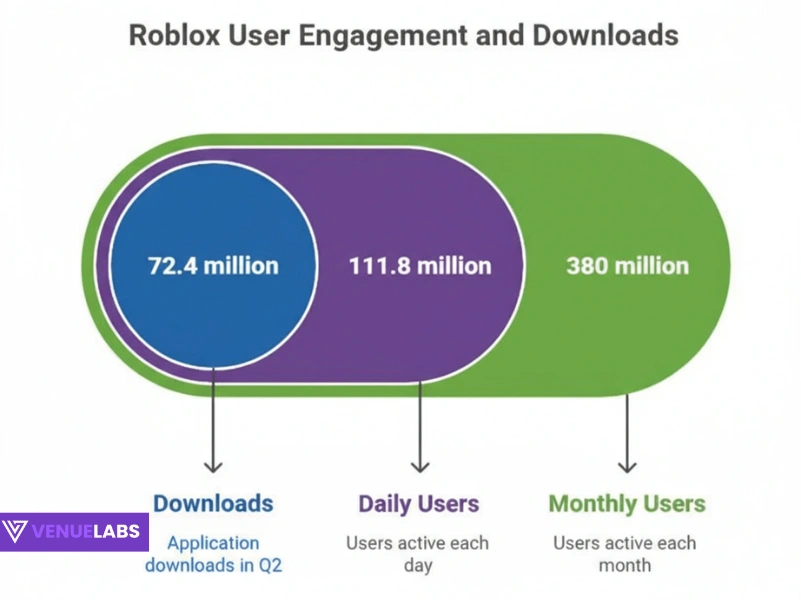
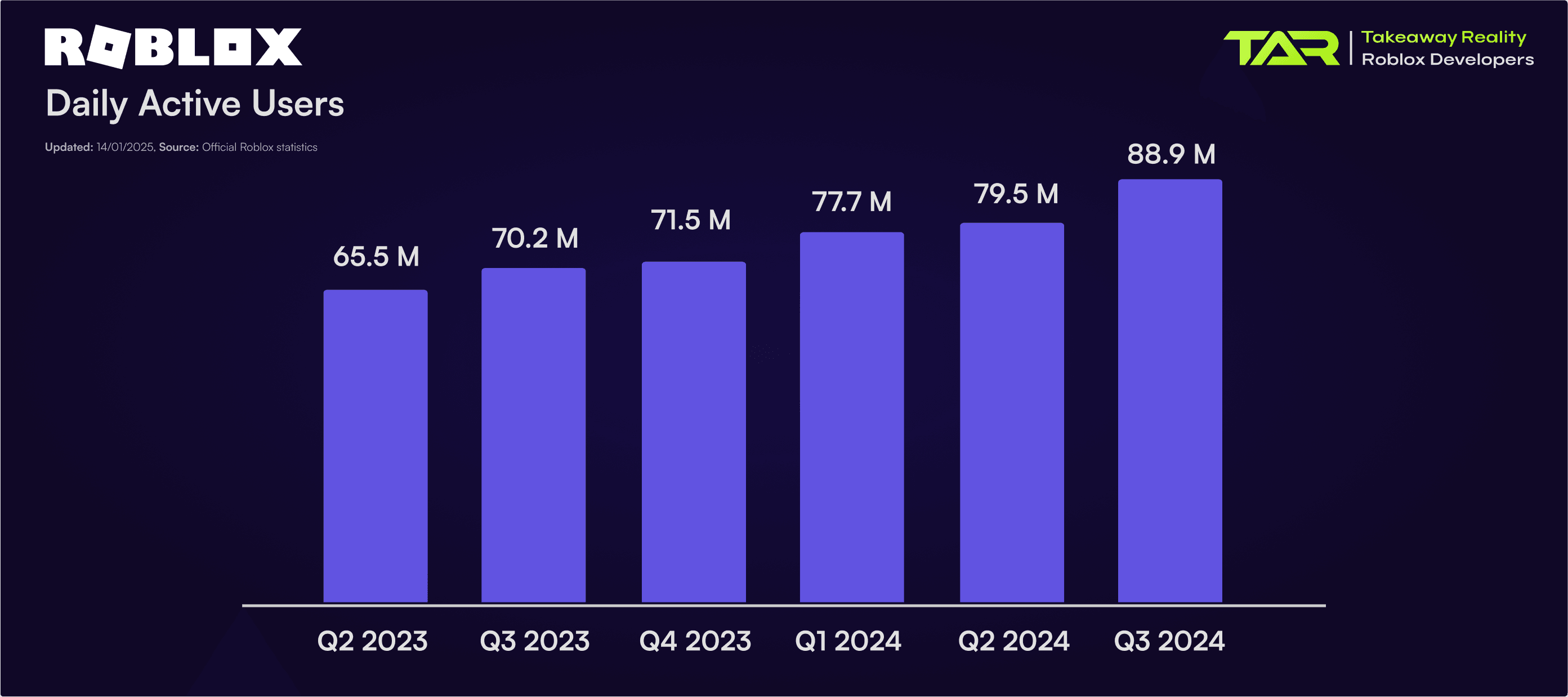
How To Add People Roblox Easily Your 2026 Guide . Roblox 2026 Logo REVEALED New Color New Look YouTube Maxres2 . Roblox 2026 YouTube Oar2 . How Many People Play Roblox 2026 Latest Insights Untitled Design 2025 10. Roblox Statistics 2025




ROBLOX EM 2026 VAI MUDAR TUDO YouTube . Roblox In 2026 YouTube . LOGO Roblox 2026 YouTube Maxres2 . Roblox 2026 News Age Russia Ban Updates Game Codes.webp. Roblox Whats The Right Age To Start Playing


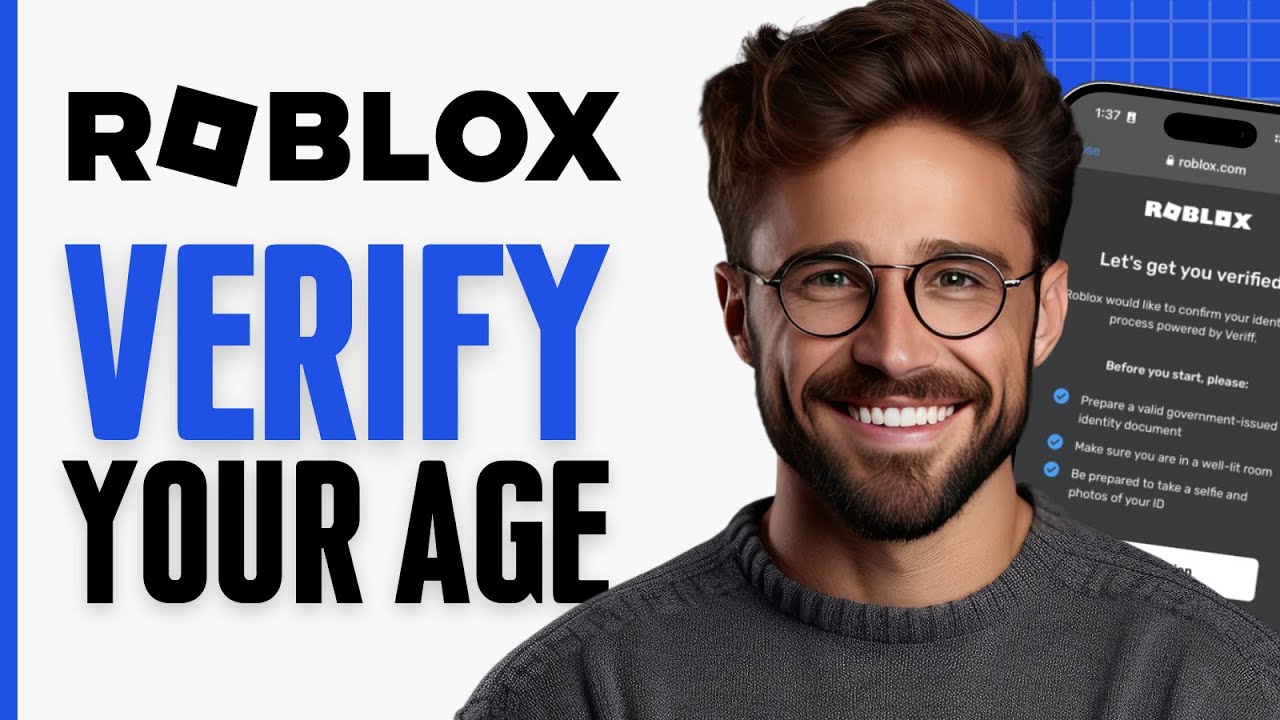

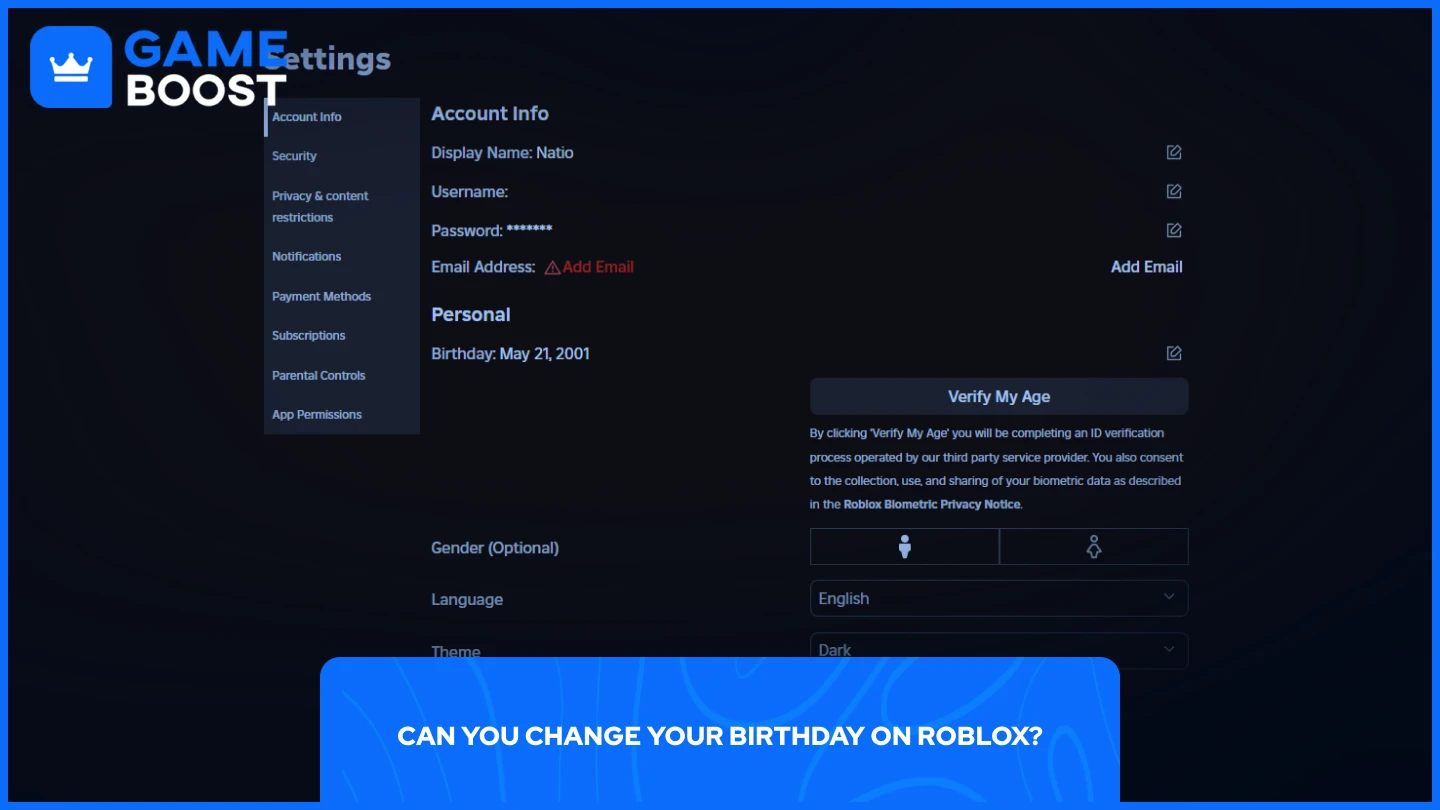
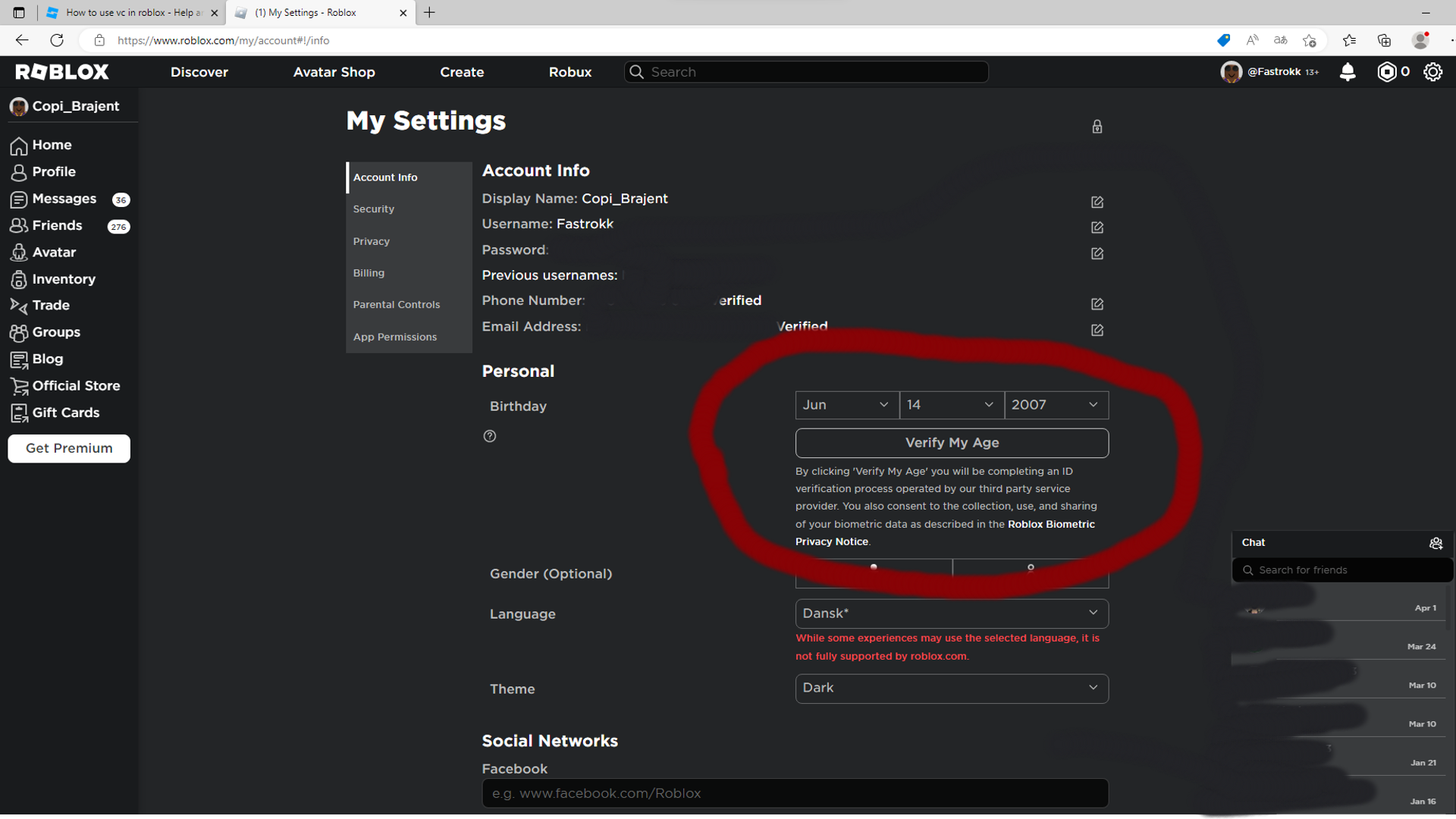
Roblox En 2026 Roblox NoFilter. Roblox 2026 New Logo REVEAL First Look At The Future Shorts YouTube Hq2 . How To Verify Age On Roblox Easy YouTube . How To Add Age Guidelines To Your Roblox Game YouTube . How To Change Your Birthday On Roblox 2026 Guide D401dc66 D505 4529 Aab2



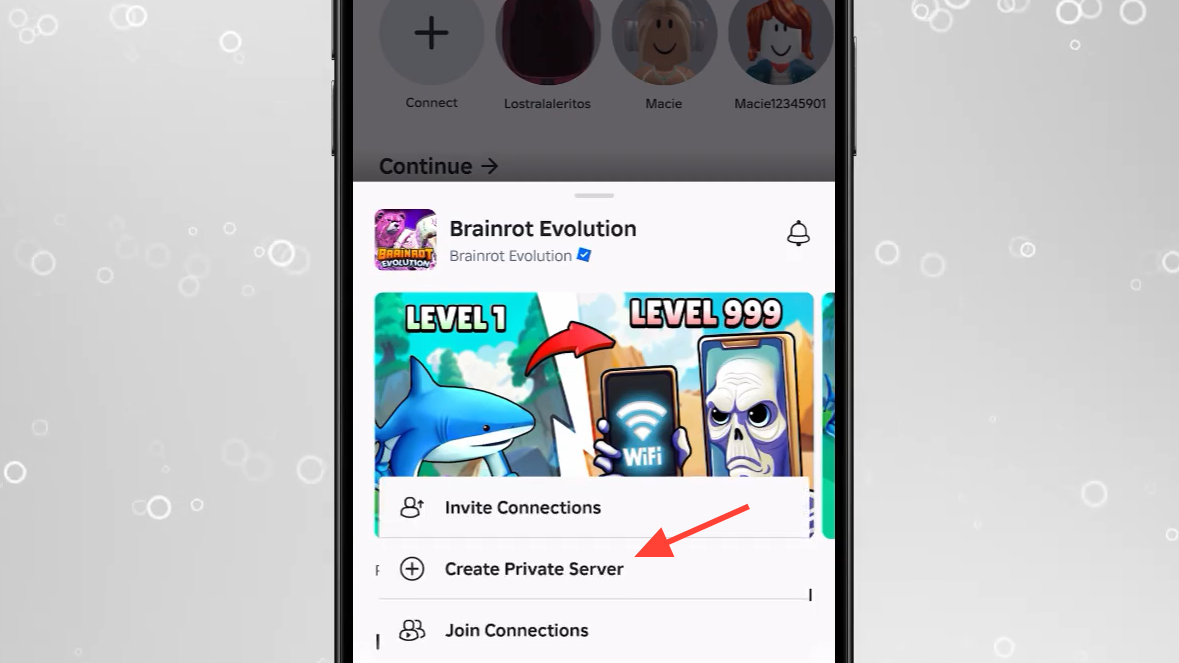
POLL Roblox Will Soon Make You Prove Your Age To Chat Will It Work Sitecard V3 . Roblox 2026 Complete Guide To Earning Robux Using Promo Codes And Roblox Appstore . Roblox 2026 Logo YouTube Oardefault . What Countries Have Roblox At Ronald Piper Blog . How To Use Private Servers In Brainrot Evolution On Roblox 2026 Image 364 1


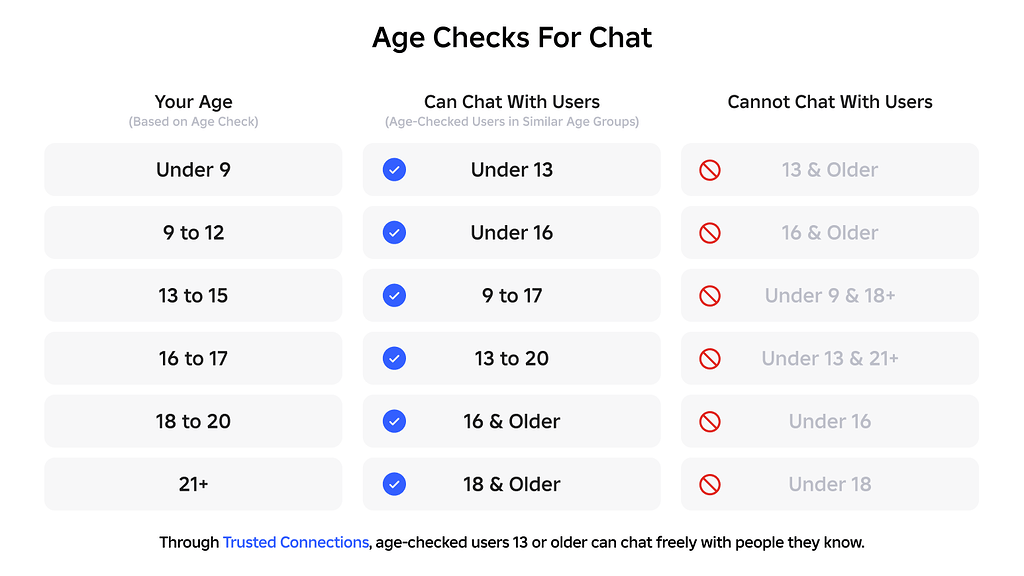
How To Verify Your Age On Roblox Using National ID Verify Roblox Age . Roblox Introduces AI Selfie Age Checks For Unfiltered Chat And Trusted F95046. Safety By Age Roblox. How To Use Private Servers In Brainrot Evolution On Roblox 2026 Image 366 1 . Age Check Requirement To Chat Now Live Globally Page 36 2 1024x576
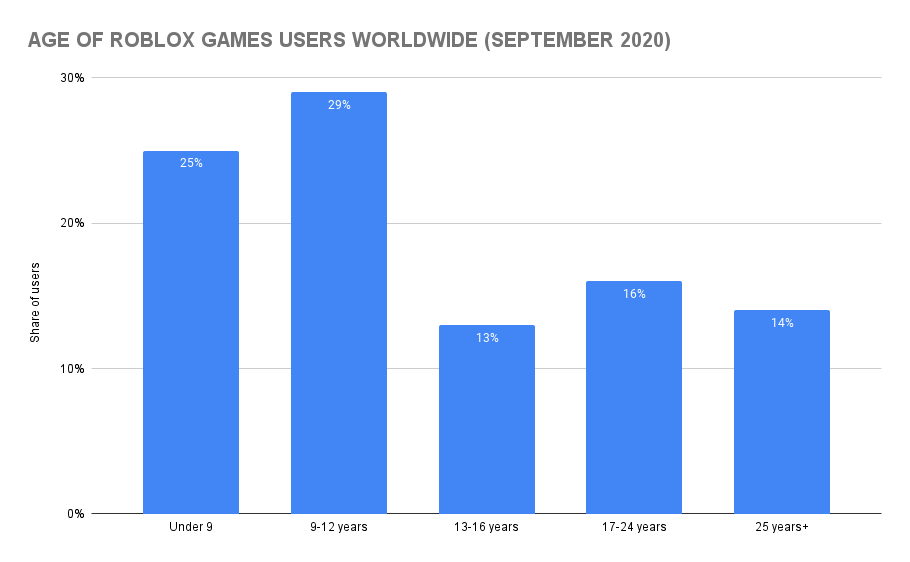


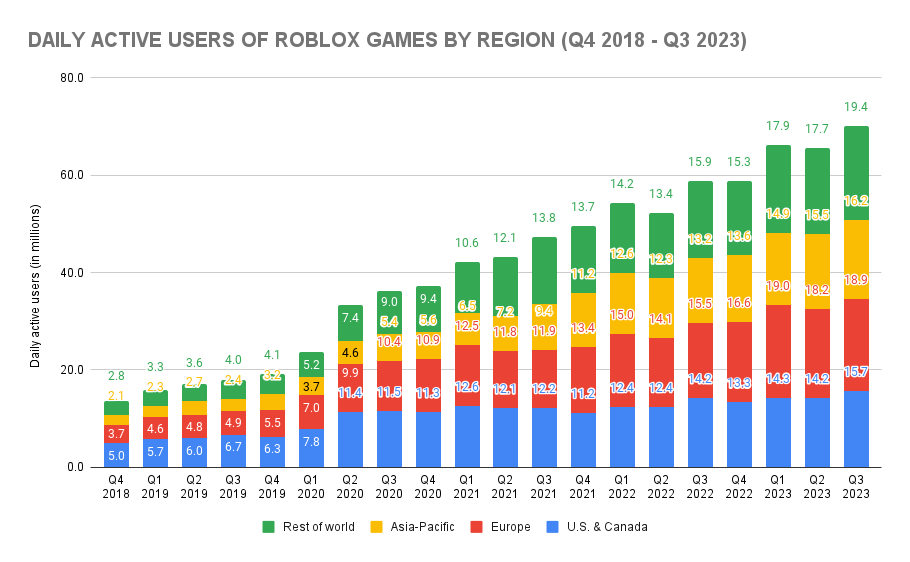

How Many People Play Roblox Roblox Statistics 2023 SellCell Com Blog Age Of Roblox Games Users Worldwide . Kids News New Roblox Safety Update Explained KidsNews. How To Set Age Guidelines On Your Roblox Game Maturity Rating Full . How Many People Play Roblox Roblox Statistics 2023 SellCell Com Blog DAILY ACTIVE USERS OF ROBLOX GAMES BY REGION Q4 2018 Q3 2023 . Prepare For 2026 With Roblox Trends TikTok Img